
Policy management · CRMDAY One
Your whole book of business, by status and by household.
ACA, Medicare, Life, dental, vision and P&C policies in one portfolio: who owns them, what is active, what needs attention today and what renews next.
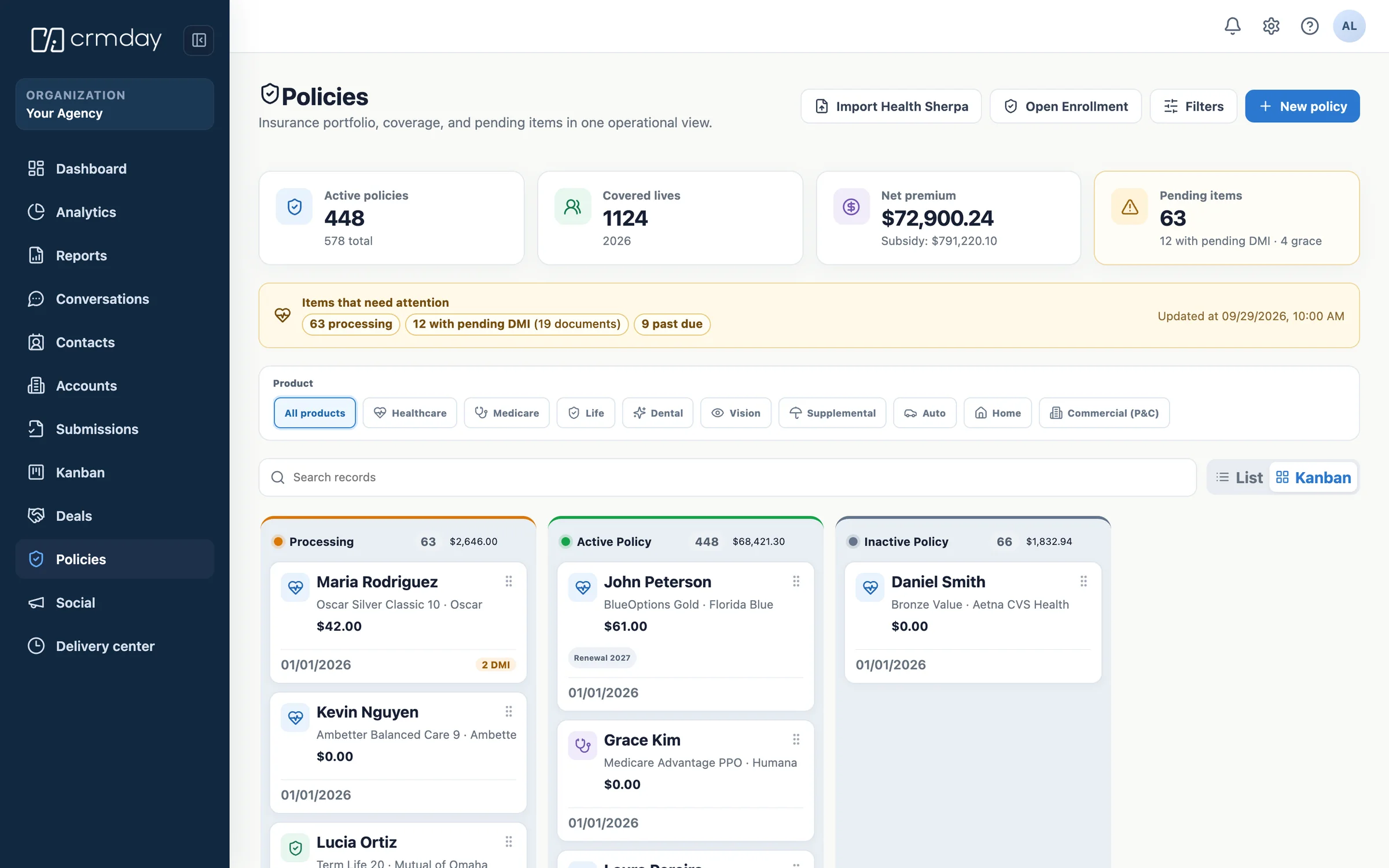
One portfolio
Every product line a household buys, in the same record.
Agencies rarely sell one thing. The portfolio holds each line with the fields that line actually needs, so a Medicare policy is not a health policy with blank fields.
Health & ACA
Marketplace plans, subsidy, DMI and plan year.
Medicare
Advantage, Supplement and Part D, with effective dates.
Life
Term, whole and final expense, with beneficiaries.
Dental
Standalone or bundled, per member of the household.
Vision
Coverage and renewal beside the rest of the record.
Supplemental
Accident, critical illness and hospital indemnity.
Auto
Vehicles, drivers and coverage on the P&C side.
Home
Property, dwelling coverage and renewal dates.
Commercial
Business policies for the clients who also run a company.
Available lines and fields vary by plan and configuration.
Household view
One client, every policy they hold.
Open a client and the whole household is there: who is covered by what, which policies are active, what expired and where the next conversation is.
Coverage
Coverage across the family
Spouse and dependents linked to the policies that actually cover them.
Gaps
What is missing
A client with health but no life or dental is an opportunity, not a gap in a spreadsheet.
History
Documents and timeline
Signed forms, consent, conversations and tasks attached to the policy they belong to.
Status and work
A board that tells you what to do first.
Policies move through the same states your operation already talks about. Drag a card or change the status and the work queue updates with it.
Views
Kanban or list
The same portfolio as a board to work through or a list to filter and export.
Filters
By line, carrier or owner
Slice the book by product line, carrier, producer, agency or effective date.
Ownership
Who answers for it
Every policy carries its producer and agency, through the whole network.
What needs attention
The book tells you before the client leaves.
Most lost policies were visible weeks earlier. The portfolio turns those signals into assigned work instead of a surprise at renewal.
DMI
Documents pending
Data matching issues with the deadline and the owner responsible.
Billing
Grace period and past due
Policies at risk of termination surfaced while there is still time.
Renewal
Renewal window
What renews next, with the outreach already scheduled.
Portfolio
Agent of record changes
Policies that moved to another NPN, flagged for review.
How policies get in
Four ways in, one portfolio.
The book fills itself from the work your team already does, instead of a monthly catch-up with a spreadsheet.
- Sync
HealthSherpa import
Applications, effective dates and renewals reconciled without duplicates.
- Quote
From the ACA quote
The plan selected in the quote workspace becomes the policy on the record.
- Manual
New policy wizard
A guided flow per product line, with the fields that line requires.
- Migration
Spreadsheet import
Bring an existing book in by mapping your columns to the portfolio.
Connected workflows
The policy is the center of everything that follows.
What is insurance policy management?
It is keeping every policy you sold — line, carrier, premium, effective dates, status, documents and owner — in one place, connected to the client who holds it.
Done well, the portfolio stops being an archive and becomes the operation: it shows what is at risk today, what renews next month and which household is one conversation away from a second policy.
FAQ
Policy management in CRMDAY One.
Which product lines can I manage?
Health and ACA, Medicare, Life, dental, vision, supplemental and P&C lines such as auto, home and commercial. Each line has its own fields, so you are not filling a health form to register a life policy.
Can I see the policies by status instead of a long list?
Yes. The portfolio works as a kanban by status and as a filterable list. You can filter by product line, carrier, producer, agency and effective date, and export what you filtered.
How do I know a policy is at risk?
DMI deadlines, grace period, past due payments, renewal windows and agent of record changes are surfaced as work with an owner and a date, not as a number on a dashboard.
Do I have to type my existing book in?
No. Policies come in from the HealthSherpa import, from the ACA quote workspace, from the new policy wizard or from a spreadsheet import where you map your own columns.
Do policies connect to the household?
Yes. Policies belong to clients and households, so you can see who is covered by what, which members have no coverage and what the next conversation should be.
CRMDAY One · free trial
Run the book you already have, with the whole picture.
Bring policies, clients, conversations and renewals into one operation instead of four tools.
No credit card required